
So..
I’ve got this new AT200 tablet, and if you’ve read my previous installment, you’ll know it’s virtually useless.
Thankfully, using my brain and modern technology, I’ve overcome the hurdles set-up for me by the large multi-nationals that won’t let me install whatever software I like on my machine.
Installing Play Store apps on the AT200
This little guide is to help the owners of the defunct AT200, which is virtually a dead dog if you don’t have the right software installed, put more and better apps on their machine.
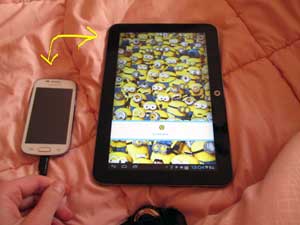
I did this using a phone. Cracked Samsung GT-7566. Relatively cheap Chinese model. Set-it-up to receive apps from Google Play Store.
As it’s impossible to install, I use this device as a gateway to the AT200.
- Pick the app you want.
- Install it to the phone.
- Transfer it to the tablet.
Job done.
Here’s how.
- Select the file you wish to transfer.
- Change it’s name to .zip
- Turn on your BLUETOOTH.
- Select the file and SHARE it to the AT200.
- Accept the incoming file…
- Change the name back.
And HEY PRESTO!!
Google Play apps on a Chinese bought Toshiba AT200 (thinnest tablet on the market)!
Related Reading

Google Play China: Making US Google play into Chinese Google Play This guide will instruct you on how to access Google play store in China,...
If you’re planning a trip, or maybe living there as an expat, these are the apps you’re going to want to have installed to your...
OK. So those not been to China, will not know: the nation’s idea of innovation is looking at other peoples ideas and copying them… Being...

A hiking trip for Mount Rinjani in Lombok

Pokhara you will be familiar with, if you’ve been reading the blog. Besi Sahara less so. Besi Sahar is the gateway to the Annupurna Circuit...
