Etrex Garmin GPS to Google Maps

This post describes how to create Google Maps from a GPS devise.
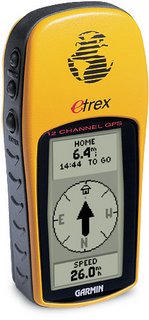
Your Etrex will output two lots of data available from the GPX files.

The two types of data allow you to create.

A Google Map of Waypoints

A Google Map of Tracks

There is a process you need to follow:-

Plug in your GPS unit.

Access Ozi Explorer.

Use the interface to import your waypoints..

A Google Map of Waypoints

1) Ozi Explorer
Get Waypoints from GPS

File > Save Maps to File > Export to GPX – Save to Desktop

2) GPS Visualizer
You’ve got a selection of options.

In order to get them into Google Maps, they have to be in a web accessible format. So choose Google Earth format.

Once your file is uploaded you should be given a link to download your file which looks something like this 1211203282-21568-82.37.19.123.kmz.

Click on it get it to your desktop.

3) Googlemaps
Go to Googlemaps.co.uk

Go to My Maps

On Create New Map > Import > KML File

A Google Map of Tracks

… lifted straight from previous blogs on the subject.

1) Ozi Explorer
From the interface > Get track from GPS

If you’ve done it correctly, you’ll get a tally in the toolbar.

Wait until this has finished.

File > Save Maps to File > Export to GPX – Save to Desktop

2) GPS Visualizer
Again, you’ve got a selection, choose Google Earth and your file will convert to a web-ready format.

From your link, 1211203282-21568-82.37.19.123.kmz, save to desktop.

3) Googlemaps
Go to Googlemaps.co.uk

Go to My Maps

On Create New Map > Import > KML File.

If the file is a large one Maps will split it up over a number of pages.

That’s it! Google plots your waypoints/tracks then zooms to center the map.
It’s as simple as giving your waypoints/tracks some names and you can share this map with the world.

Hardware

Garmin Etrex GPS

Garmin PC interface cable (RS232 serial port connector) – not applicable to Geko 101

Escape from Israel – The truth about Israeli Border Control


Getting in was never going to be easy.
Getting out proved more difficult.

All said and done, I had 2 missed bookings, 2 additional nights and a missed flight directly attributable to Israel’s over-dominant tourist police.

Getting In
Crossing from Taba, Israel.

As I had to yell into the face of the border guard in Taba in order for him to stop kicking at my feet, “I’m a tourist, I’m visiting your country as a tourist. LEAVE ME ALONE”.
You may think I’m joking. I’m not.
I was physically and mentally poked and prodded, detained to 8pm, the time the border was closed, in the knowledge that I would not make it to the crossing in time.
I had a hotel booking in Jordan that night.

I had to sleep on a bench after having walked across Elat with a 14kilo backpack no money and no way of getting any.

Welcome to Israel. Sounds like your ideal destination doesn’t it?

Getting Out
After having waited at the airport for 6 hours the border guards detained me, again for no reason.
After having answered their questions and being searched for 20 minutes, they informed me I would not be allowed to board the plain because I was ‘Intoxicated’.

After sitting in the lounge for six hours, I had drunk a few beers, no more than a few.
So, the Israeli authorities finally let me know, after questioning me, searching my gear and finding nothing, that I was not being allowed on the plane because the “ThomsonFly authorities” had deemed I was too drunk to fly.

Only afterwards when I was escorted away, I met the “ThomsonFly authorities” who was a girl behind a desk.

Ultimately this decision lies with the cabin crew, it is at their discretion who boards the plane or not.
I was made to wait 2 days for another connecting flight.
Again, a ludicrous, un-necessary, illegal and in my view spiteful domination by the Israeli authorities.

Unnecessary, Pointless – Don’t expect an easy time
No explanation was ever given for any of the searches, detentions or delays I suffered at the hands of the Israeli authorities.
Once inside, I found Israel a chilled and generally welcoming bunch of people, but my treatment by the authorities made the difference between a country I would recommend, and one I would avoid.

If you are if in the region with stamps in your passport, I’m going to have to go with the latter; Avoid. Not because I didn’t like it, because the treatment you can expect may not justify your wanting to get in.
Consider your options, if you don’t particularly want to go there, don’t.

Windows Live Writer – Blogging Software

Installed this at the beginning of the trip, and, as promised I’d inform you about it usefulness how much I hated it, why you should buy it etc.

Windows Live Writer- for Blogger

You install the software and give it the URL for your blog.

Your Google ID and password. The wizard then goes off and takes an imprint of your blog and stylesheet.

Also included is the bits and pieces for formatting and reviewing without a connection, providing previews on WYSIWYG, always handy for previewing those images, tables, maps or videos.

This has been vital in that without a connection, usually you’re limited to a Microsoft document and having to do the CSS styles, guess at previews of images tables, CSS conflicts all the rest of it, it’s pretty much guesswork until you get online.

With the live writer, this trip, I’ve not had the normal pressure of finding good connections at every stop, the workload has been dished out in a regular fashion.

It’s like a desktop publishing software for blogs. Save your documents and publish when you’ve got a better connection.

Advantages

The Live Writer has a couple of advantages over the Google platform alone.

I can’t say whether I’d use it as much at home but on the road the answer to the Question: – Are Americans clever?

In this case has to be: Yes.

http://www.download.com/Windows-Live-Writer/3000-2068_4-10572482.html

Windows Live Writer

Are Americans Clever??

Well I wondered this one as I sat in the Blogworld convention in Vegas not more than 6-7 months ago.

“Are Americans Clever?” cos in a way there’s a lot of churn over there and most of the people doing the churning don’t know they’re churning.

WIndows Live Writer
This little piece of software can be testament because if you’re a travel blogger, many will be the times when you’ll find yourself with all the material to do a blog but a bad connections.

This software, I am hoping, (if Americans are clever), will take away the sins of the non-broadband world and deliver us from bad uplinks, 6-10 minute image uploads and all the other nightmare scenario’s you can expect when blogging on the road.

Compose: then post as your connection allows.

Download it here: windows live composer