New GeoBlog Unleashes the Use of GPS, the Potential Future for Travel Blogs
Michael Tyler employs the use of GPS is his newly launched blog, https://www.michaeltyler.co.uk/. Geoblogging may well be the wave of the future for travel blogs.
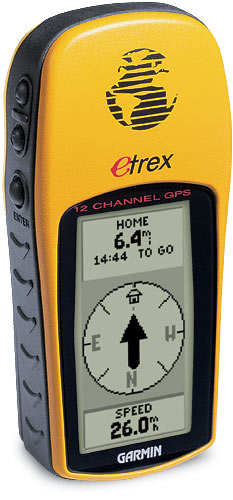
Location (PRWeb) March __, 2007 – A new kind of travel blog, dubbed the GeoBlog, has been launched by creator Michael Tyler. The GeoBlog, at https://www.michaeltyler.co.uk/, harnesses the use of Global Positioning Systems (GPS) to direct viewers to exact geographical locations. This interactive element is a real leap forward in developing and maintaining all important user interest, a factor that’s difficult to attract in the overcrowded, increasingly generic blogosphere.
“In the UK these days, it seems everyone has GPS in their car, hand-held, or mounted on their bike or wristwatch,” says Michael Tyler. “It occurred to me why not use GPS for a travel blog.”
Having exact GPS locations, times, dates and altitudes has given rise to the ideal platform for passing on more detailed, more accurate and more precise information — and nowhere is this new clarity of communication more evident and necessary than in the ever-expanding realm of travel.
Michael Tyler employs this new application is his travel blog, dubbed GeoBlog, https://www.michaeltyler.co.uk/. The GeoBlog lets visitors know exactly where specific tourism features are, as well as dining and accommodation locations. Some of the great random views and general wildlife spotting opportunities are to be found in the first GeoBlog series on New Zealand.
Michael Tyler explains, “Relaying information through an easy-to-use, interactive interface has increased the session lengths of visitors by 300 percent. Since the Google Map mod was added to the header, visit times have gone up from an average of 20 seconds to over 3 minutes. Some visitors stay on the site for hours, browsing through all the pictures from the various places I’ve visited. The technology is out there; with sites like GPS Visualizer, Google Maps and Yahoo’s Flickr and with digital cameras and mobile phones with cameras, plus Google’s recent announcement of the inclusion of GeoRSS standard feeds, anyone can log, create simple maps let visitors know what they’ve being doing and where they’ve been doing it.”
To see Michael Tyler’s GeoBlog, complete with GPS enhanced visualized locations, please visit https://www.michaeltyler.co.uk/.
Contact:
Michael Tyler
Wolverhampton
England
(44) 0190256237
(44) 07864967630
###