Norton Antivirus 2008 vs Free Antivirus Software

Norton Antivirus 2008 is shit.
Following invitation, recently installed the 2008 version of Norton Antivirus.

Free software
Usually you have to pay, but this was free so why not?

The software took a couple of minutes to download.
I installed it on 11th Dec.

The following major effects were noticed over the course of it’s short, but eventful life:-

  • System boot-time went from 10-20 seconds to more than 2 minutes.
    After a number of boots, this did not improve.
    I don’t see long boot-times as necessarily a bad thing. It can be indicative the software is doing it’s job learning the systems and programs, learning, after which it would become faster.
  • Boot times did not improve, running at roughly 2 minutes (4month old 1.8ghz Pentium dual core with 1gb of ram).
  • After 8 days running, system experienced stability issues, crashing Dreamweaver and Photoshop, two of the software’s I use every day.

When I came back to work on Wednesday, I essentially didn’t have a computer to work with.
It’s taken me from then, the 18th, till now, the 4th, to fix the problem and install firewall and virus protection i.e wasted about 8 days.

If you’re tempted to download Norton 2008, don’t.
Or if you do, be prepared:
Here’s what you have to do to get rid of the stuff.

Rolling (backwards)
I rolled back to 2007 which I had on disk.
That failed to renew the subscription and virus definitions.
I then had to roll back to 2006.
The subscription and virus definitions failed when I came to work on the 2nd.
This was despite having over 103 days of subs left.

Uninstalling Symantec
The uninstaller failed.
After searching, Yahoo Search
I visited the Symantec site where they have an Symantec Unistaller tool for when things go wrong.
Downloaded this.
Failed.

Attempted to download and install Kapersky (internet software). Was told I had to uninstall Norton first.

I had no firewall to go surfing around the ‘net, pick up my emails or leave a broadband connection safetly.

Visited Cnet found this Revo uninstaller.
It identified the dynamic library and system entries which I had to go through and delete manually.

System now works.

Norton 2008 In summary
For anyone running an older system, I dread to think. You’re looking at dial-up style frustration say from a 1999 machine.
Paper readingly boring boot times.

Apparently Norton now charges for help facility so that goes some way to explaining why this release is so diabolical.
As an IT professional, non-core software should sit in the background. Quietly.

Here’s my own take Antivirus Software.

Evaluation of Anti-Virus Software 2008

Avira
£Free or £19.99
Pro’s: It’s free. Clean interface, easily navigable.
When I installed the paid version, it seemed to import all the Network Settings from Zone Alarm meaning I didn’t have to run the network set-up wizard on each computer or go round specifying individual IP addresses or ranges. An easy migration I think you’d call that.
The free version runs scheduled scans, something which Avast doesn’t do.
Con’s: After having run it for 2 months+ on two machines, free and paid versions.. none.
Installed: 2 Months
Download trial

Zone Alarm
£Free
Pro’s: It’s free. It’s fast.
Con’s: You’re going to need to be a bit of an expert. But I’m here to help you :)
a) To set up your home network.
You need to specify your Local IP Address and Subnet mask. You need to look at your Router>Setup> Internet settings retrieve the settings which should look something like this
Local IP Address 192.187.187.1
Subnet mask 255.255.255.0
and enter them in the Safe Zone manually.
Then it works just fine.
b) It offers a firewall and virus scanning software, none of the extra bits you may have become accustomed to twiddling around with.
Depending on whether the Internet is full of scary people out to get you OR you simply want a system protected from incoming threats decides whether you should choose this Anti-virus software.
As an IT Pro who spends every day on the ‘net, this software works just fine and is system friendly.
Installed: 5 days
Download trial

Kapersky
£29.00
Pro’s: Easily the quickest in terms of getting connected, getting it’s shit and sitting quietly in the corner (like a good Russian should).
Con’s: Took a while to identify viruses, you may have to move the scanners above the default level to flush the system out. The Kapersky gets high rankings for finding viruses on your system, so you should see this as a Pro as long as you set the levels right.
Set up the scans correctly and this will be the case.
Slight spectre of overiding security issues with Kapersky being located in the good old USSR.
Installed: 1 month
Download trial

F-Secure
£49.00
Pro’s: Spam filtering binned all the stuff I would have deleted myself.
Con’s: Compared with the other softwares here; slightly long boot times.
Scan’s: Scheduled scans seemed to take a decade, on Friday I seemed to be pulling my hair out then realised the system was on scan. At least on Norton you get the icon telling you there’s something happening, this doesn’t happen with F-Secure.
Installed: 1 month
Download trial

AVG
$33.00
Pro’s: Faster boot times than F-Secure.
Con’s: Needs a lot of work doing on the interface. Patience and manual dexterity are the name of the game if you want the software to work.
For example: If you have a persistent spam, you need to go into the message source and manually scoop that emailers address then paste it into AVG’s blocked senders list. This is the only way to block incoming emails without them entering your inbox.
Setting up a local network: Again, a cut and paste job. You’re going into the router, finding the IP range and subnet mask and adding them to your trusted networks.
I couldn’t achieve a two way connection even after fiddling round. Not ideal if you’re planning to share your workload between rooms, people or computers. If you plan to network, follow the steps in Zone Alarm
Installed: 1 month
Download trial

Summary
Most of these software’s are either more complex and do less or don’t work as well on the things you really want, Avira/Zone Alarm work as well if not better than anything Norton has done in the past and steam ahead of the current release.
In terms of the Spam blocking, Norton still takes a lot of beating, F-Secure probably comes the closest in that respect.
Kapersky was good in that it was fast with high virus availability and lurked in the background with little problem. I hardly knew it was there.
Free software, I plumped for Zone Alarm and Avira. I can recommend it as the software which works to protect you from malicious threats on the Internet, Avira did a great job in mopping up, deleting spam and doing the weekly maintenance
Unlike Norton Antivirus 2008, none of these softwares stopped my computer working and crashed all my software then asked me to phone a helpline.
Shame on you Norton.

Remove redundant styles with Dust-me Selectors

Part of keeping stylesheets up-to-date involves searching through the styles and removing them which have expired with no further use, previously involving a print out of the stylesheet, highlight pen and a copy of your source code.

A boring but essential part of everyday programming.

This Firefox plug-in is free and will remove all those redundant styles without the boring but necessary job of going through yourself.

Grab it here.
dust-me-selectors

5 Essential Plug-in for Firefox 3

5 Plugs in I use every day.

ff-flagfox
Flag Fox: Little icon sitting in the bottom right of the browser.

Tells you what country the site is located in . Clicking brings up more details such as IP address, WhoIs details. 

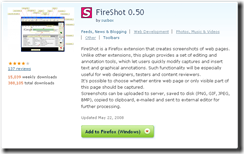
ff-fireshot
Fireshot: One of a number of screenshot programs.

Doesn’t cause stability issues and does what it says on the tin.

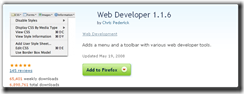
ff-web-developer
Web Developer: Analyse pages for JS errors, Css compatibility, cross browser compatability.

Any major design consideration can be checked in the tools section of this handy little add on.

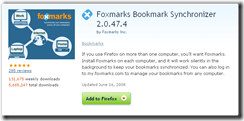
ff-foxmarks
Foxmarks: Synchonise bookmarks across browsers.

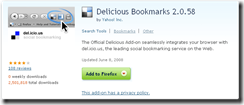
ff-del-bookmark
Del.icous: Bookmark socially with this add-on.

Why I hate Google

I hate Google because they lie.

google-is-greedy
Google manipulates results to make more money

Let me explain.

Background

I’ve been an Internet publisher since 1998, back in the day when people were using AltaVista as their main search engine, Netscape navigator was main browser, Yahoo was a new invention and Usenet was the in-thing (social networking hadn’t been invented then).

I was a publisher when Google bought the trust of the internet community with a repository of old musings in something called the Déjà-News archives

Even the spammers thought Google was alright.

Florida Update (Feb 2005)

Spammers spammed, hoaxers hoaxed, phishers phished, the good generally mixed with the bad and the Ugly.
Google said, this is a bad thing.

“Why do we need all these spammy sites all mixed in with the good people trying to make honest money, Serg?”

In 2005, Gooogle rolled out a massive update. Called it Florida, it took a chunk of sites and cut their traffic by half.

Of course, everyone in the industry panicked.

But there was method in this madness

Google were clever. Those sites which were spammers, made busy changing everything, changing:

  • their page names
  • their page’s content
  • keywords densities, descriptions
  • changing backlink text
  • getting more links through publishing more spam

Just about anything anyone could suggest that would improve their rankings again.

They made a lot of changes.

By calculating changes and comparing it with how willing webmasters were to change their site over this period, (about 4 months), Google could make a guess as to that sites actual worth. Legitimate sites might see the ability to adjust perhaps 10% content for the sake of a better ranking, whereas a site with useless content would change anything.

Simple.

Those who adjusted little, (there was really little to change, believe me), stayed in. Those who adjusted a lot, went out.

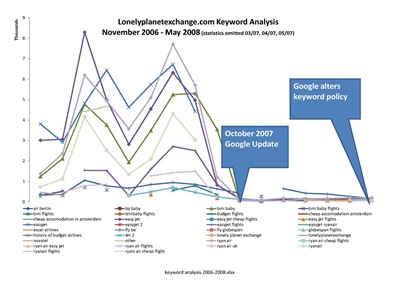
Penalty Update (October 2007)

In October 2007, another update took place. Again, my site took a massive hit.

Google vaulted it as a punishing paid links** update.

My site has never accepted paid links. Nor ever paid for links.

I said nothing, my site doesn’t publish spam, nor does it undertake practices not sanctioned in the ‘Google official Webmaster Guidlines’. It’s taken me from then until now to put 2+2 together and figure out exactly what’s happened.

Manually altering results
Google in the October 2007 began manually altering search results to generate more income in line with the forthcoming changes in it’s ‘Adwords’ policy released this May.

Previous to May 2008, Google wouldn’t allow bidding on trademarked terms.
For example: If you wanted to buy a climacool Adidas jacket you would type that into your search engine, chances are you’d come up with the manufacturers site first, then a number of other sites, also selling that particular product.

That’s where my site lived for a long time.

I sold budget flights both on a commissioned and non-commissioned basis and was the first site in the UK to do so.

My rankings were up until October 2007.

I directly attribute the May 2008 changes with the October 2007 update.

Here’s the stats.

keyword analysis 2006-2008_Page_1
Download PDF

I’ve sat back. Because, I’m fairly sure my site’s as good as it can be. It’s never broken the rules and as such, there’s nothing I can do.

Net effect of changes to Google Adword policy

Reduce the Diversity of the ‘net: Mom & Pop sites that have traditionally employed SEO techniques to differentiate themselves from the crowd are going to find their business reduced, why would Google send visitors to a site where it can find all the best goods when it can take $1.80 per Adwords click from someone who can afford to pay?
It won’t.

This will reduce the diversity of the ‘net, putting smaller, more efficient operators out of business and handing more money to corporations who take their place.

Channel more money to corporations: Google is currently straddling between freedom of information, (the spirit of the net), and corporatism. Freedom of information means exactly that, free.

Organic listings* represent free information.

Through manipulating and removing sites with high quality, focused information and allowing trademark orientated Adword adverts to appear alongside poorer results instead, Google is skewing the pitch toward corporatism.
Those with advertising budgets and skilled staff to administrate complex Adwords campaigns in a meaningful fashion.

Google likes to hide behind the veil of ‘freedom of information’ whilst reaping the profits of corporatism.

Stymie new development: I’ve developed a substantial number of pages, and Google refused to list them. (See thread).

Don’t assume, if you’re a developer and develop a top new app or service it’ll get listed. If it interferes with Google’s business interests, Google either pull it when it realises it’s making money, or not list it in the first place.

This stymies bedroom developers who depend on a traffic flow to promote their product or service.

In the past Google could be relied on to provide that relationship. That isn’t the case anymore.

Reduce search quality: If Google is prepared to sacrifice search quality in the name of ‘Adwords’, this signals to Engineers to have their own ideas.

Google have moved away from the purity of information weighted results making this a breeding ground for opportunist Engineers who stand to politicise search on whoever pays them to present in a positive light.

Search results of the future could be ruled by a cabal of powerful search engine engineers wearing funny hats, (much like Google Webmaster forums are now), thrashing out each others ego’s on innocent webmasters below ‘lawnmower man’ style whilst handing the best listings to those who pay them to speak up in their favour.

Google Summary

  • Google manually manipulate SERP’s in the name of business interests.
  • Google pretends, through it’s Webmasters Guidlines, you will get high rankings if you do the right things.
  • Google’s Déjà-News, freedom of information, spirit of the ‘net days are dead.
    If you want an impartial search engine, build your own.

* Organic listing is a listing that appears on merit.

** Link are a means of valuing a site’s worth in internet terms. The more people link to your site, the more respect you get in the community, the more your site is worth.